Nice 3D Animation and a Making Of
Nicolas Brunet created a very nice 3D animation and used SnowFlowPro for creating the snow.
Watch the animation here and don't forget to take a look at the "Making of"!
Our plugins for 3D Studio Max (Design) 2014
For those who can't wait for a new installer: just copy the files of our plugins from the 2013 versions to the plugins directory of 3D Studio Max (Design) 2014!
Nearly all plugins we've tested so far (not just our plugins) are working with the new versions.
Thank you, Autodesk!
V-Ray 2.40.02 available for download
Chaosgroup has released a patch for the new VRay version we announced yesterday. The version is 2.40.02 and fixes the following issues:
- VRayProxy: objects were in the wrong place when the "Scale" parameter was different from 1.0
- VRayProxy: objects could crash if point cloud rendering was enabled
- V-Ray RT GPU: skylight portals produced wrong intensity
- VRayFur: the level of detail Start distance and Rate parameters were not shown in scene units
New VRay version released! (2.40.01)
In secret Chaosgroup has released a new VRay version 2.40.01 on Feb 06, 2013. Only the chaosgroup forum speaks about it...
Continue reading to see the complete changelog...
Grab it while it’s… cold??
Winter is coming closer and closer. It's time for snow - SnowFlowPro!
We worked hard to bring you THE snow plugin for 3D Studio Max. Create very realistic snow within minutes. Go and grab the demo version of SnowFlowPro to check out how timesaving it will be. Our demo now works with Autodesk 3D Studio Max (Design) 2008, 2009, 2010, 2011, 2012 and 2013 (x32/x64).
Have fun with SnowFlowPro!
UAC problem (Windows 8) with Rebusfarm
The situation
Many of you may know Rebusfarm, the market leader of renderfarms. This weekend, we had a VRay animation to be done: full HD and with motionblur. You know what this means... rendertimes en masse!
Our hardware couldn't have handled that in this short amount of time and so a renderfarm had to be used.
What should I say... the software (Rebus Render Manager) is a nice thing. The plugin "Rebus Farminizer", which is integrated in 3D Studio Max, is also a great idea. It makes you feel like rendering directly on a serverfarm next door or in the cellar of your company. The money you spend rendering at Rebus is also fair enough. So much for the pros.
The problem
On the other hand I spent a whole Saturday morning until I got rid of an annoying error while using the "Smartcheck" feature of Rebus Farminizer (whose OK is needed to send a scene to the renderfarm). The message said I had to start 3D Studio Max with administrative rights to communicate with the Rebus Render Manager. "No problem!"... I thought. In fact it WAS a problem because it didn't work as expected. Running 3D Studio from my workstation's admin account didn't solve this error. My next try was to disable UAC, the User Account Control of Windows. There are tons of (video) tutorials that show you where to find these controls in Windows. After disabling it and rebooting, NOTHING had changed. The error was still there.
The solution
If you know what to do, it is a matter of seconds. You just have to completely disable UAC via Windows registry. For all those of you afraid to manually change something in the Windows registry, there are two files: one to disable UAC and one to enable UAC.
I hope this will help some 3D artists to prevent getting a headache while seeing the deadline running closer and closer towards you like I did.
3d web portal 3dtotal.com on kickstarter.com
Many of you may know 3dtotal.com. This web portal delivers news about the graphical industry and especially the world of 3D design every day.

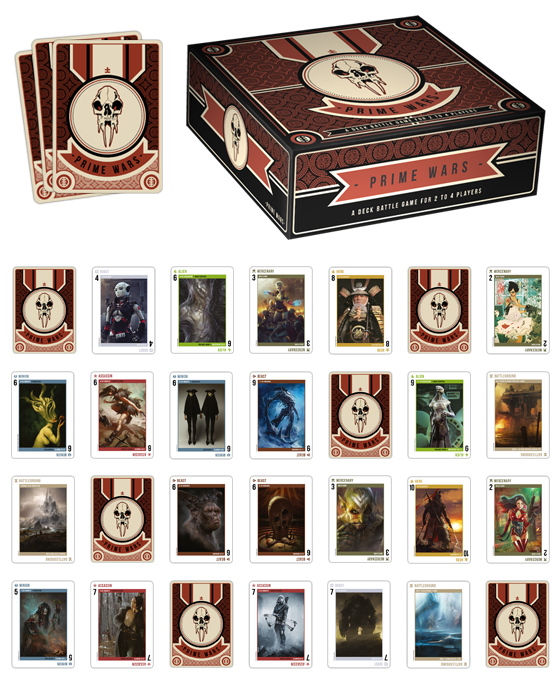
3dtotal now wants to create something really different: a strategic card battle game called "Prime Wars"! Yes, you heard right. On Aug 6, 2012 3dtotal this project launched on kickstarter.com with the goal to collect $8,000 until Sep 5, 2012.

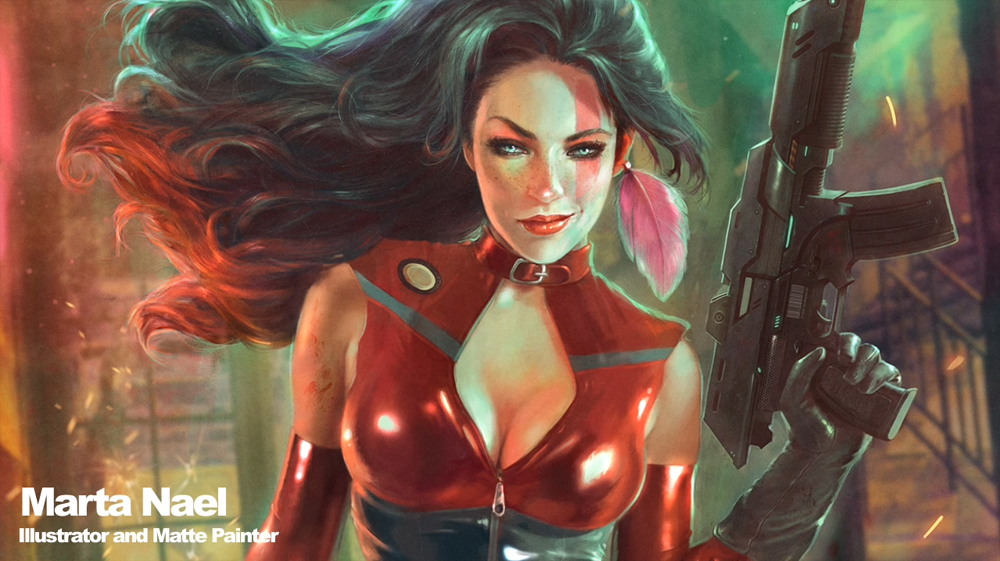
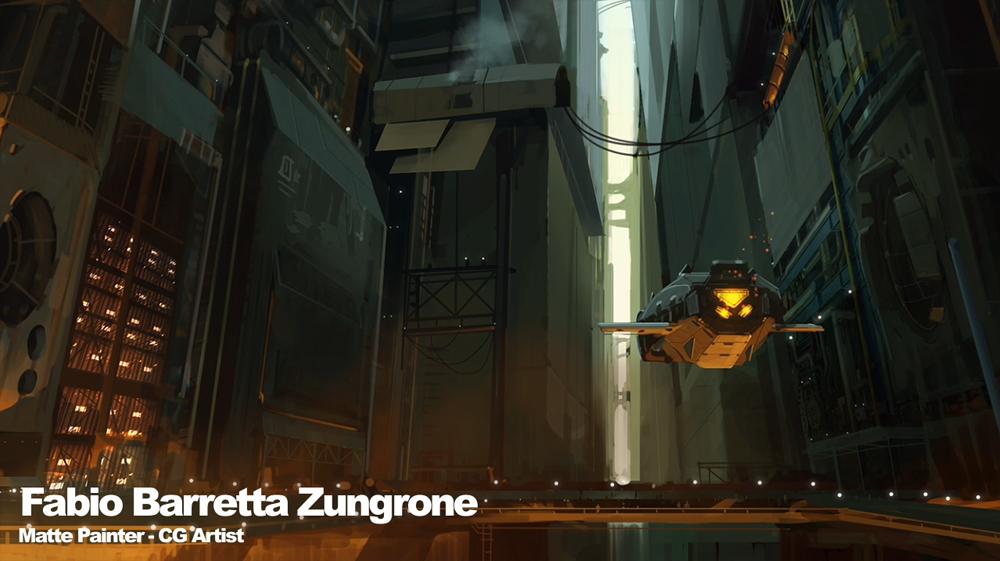
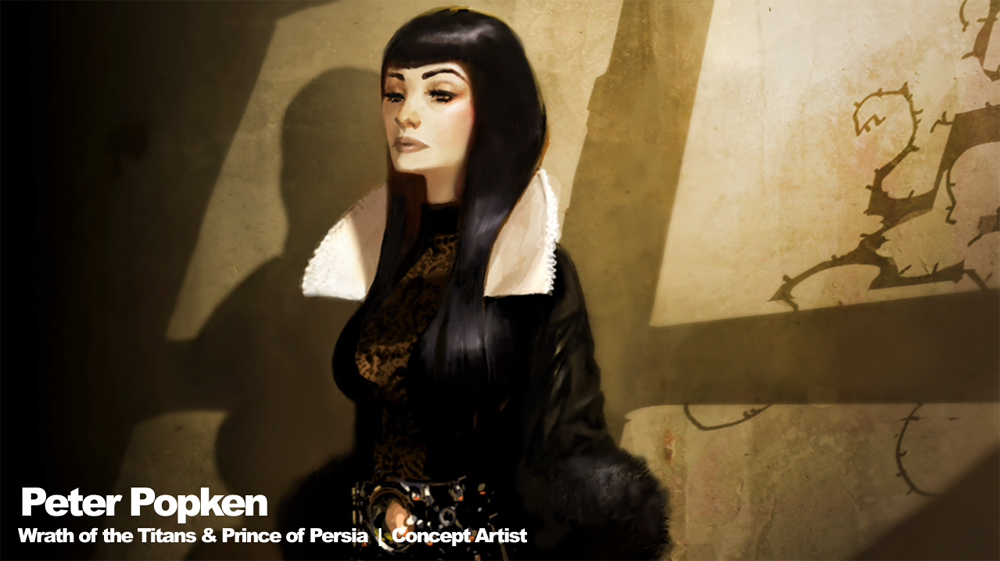
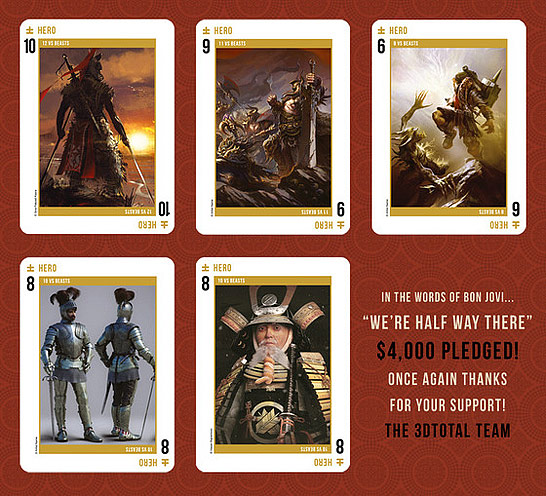
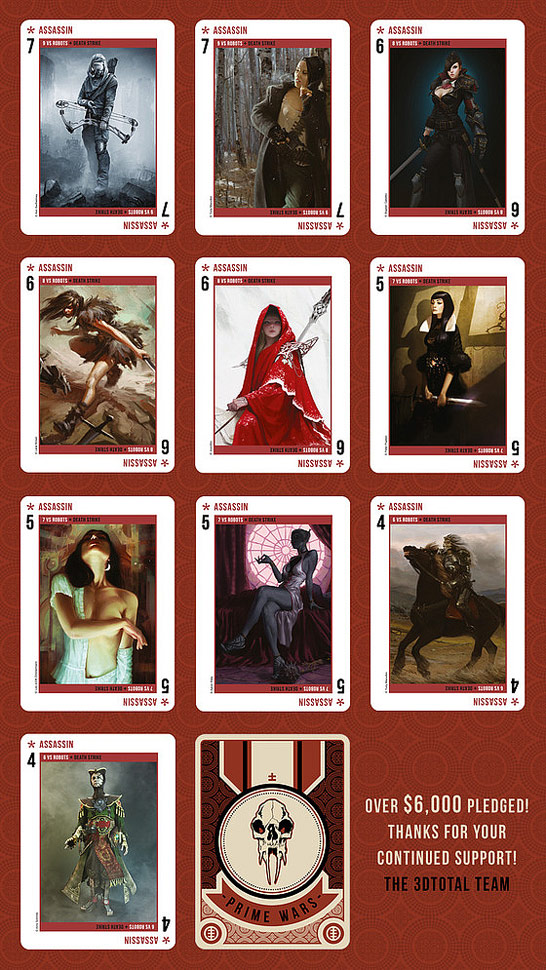
The cards have been designed with the help of over 50 top artists who created wonderful detailed characters.
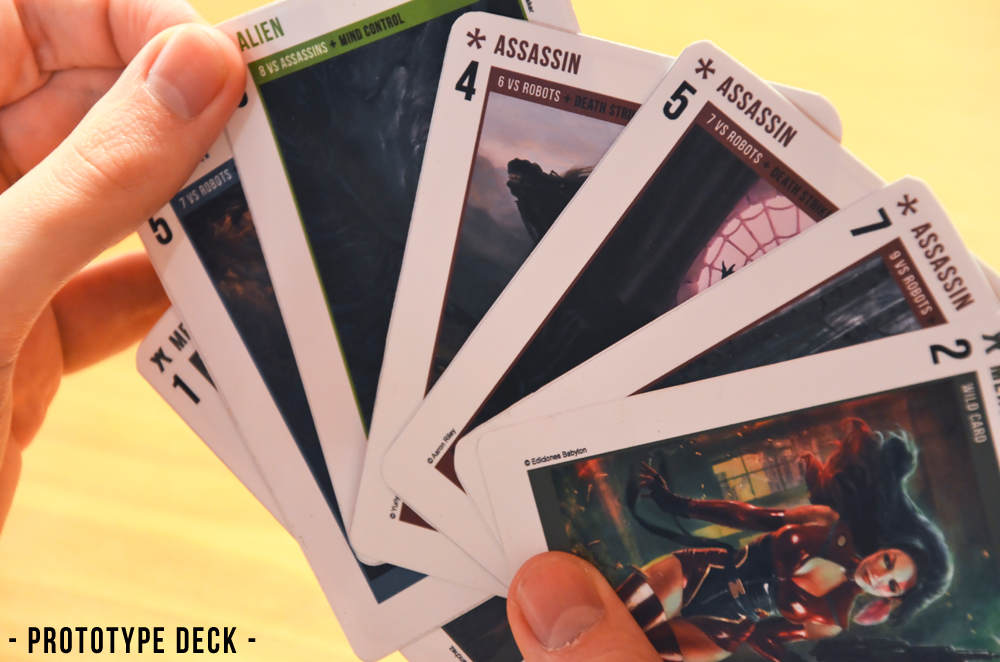
Last but not least: here are some impressions of the card game. If you like this game and want to support it and even get your own copy of Prime Wars just pledge some dollars!


Update
Like us on Facebook and get the chance to win a zwischendrin.com gift voucher
From now on, we will randomly pick five people out of our new Facebook "likes" each month to get a 10% gift voucher valid for all purchases totalling at least €5*.
Like us (and tell you friends and colleagues), that's really all you have to do! 
Update: Please note that we can only send you a voucher code if you allow us to send you messages in your Facebook privacy settings. Otherwise, there is no way for us to get in contact with you.
* Each voucher is valid for redemption on zwischendrin.com, only once per voucher code and for a minimum cart value of €5. One voucher per person only.
Undocumented feature of VRayLensEffect
About the feature
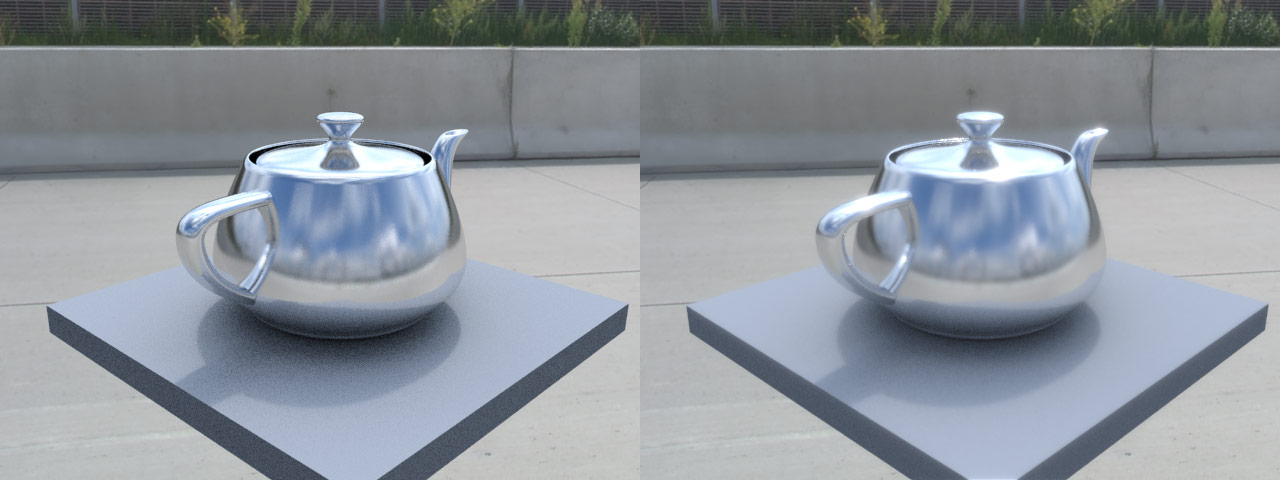 This post is about a not well (if at all) documented feature of VRay 2.3, more specifically of the VRayLensEffect render effect. Before I discovered this feature, it was very hard to tune the lens effects produced by VRay and almost all of my images were extremely blurred and shiny, which forced me to do those effects in post production.
The official VRay documentation on spot3d.com - especially the one for 3D Studio Max - does not talk about the masking possibilities of the VRayLensEffect, but in fact, this feature ultimately makes the VRayLensEffect useful!
What it does
VRayLensEffect has its own render channel: the LensEffectsSource. This unclamped channel is the base for all lens effects (Bloom and Glare) applied to your rendering. In nearly all scenes I used lens effects for, this channel was absolutely overbright, resulting in a extremely blurred image after VRayLensEffect had been applied to my renderings. Since VRay 2.3 we can overcome this fact by telling VRay to use only parts of this channel for lens effects. This is called "masking". Masking means that the lens effects are only applied to pixels with a float value above the given mask value while ignoring pixels which are not bright enough and have a lower float value.
How to use it
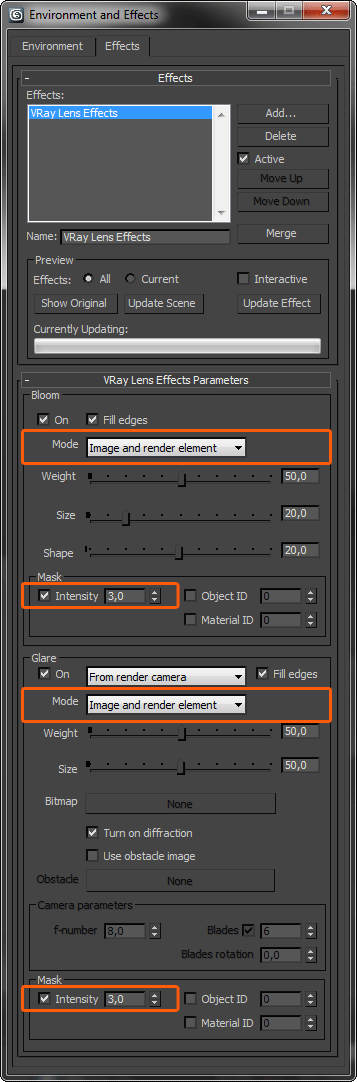 Step 1
First of all, we need to render out an image - draft quality is enough - with the options checked like shown in the screenshot to the left.
 Step 2
The next step is to check the float values of the LensEffectsSource to set up mask parameters. Pick the light source in your rendering (or the light's reflection in your object) with the color/pixel picker (rightclick on your rendering while using Vray Frame Buffer) and set the mask parameter to the lowest of the float values in the "Pixel information" window (or a slightly lower value). Render again.
 Step 3
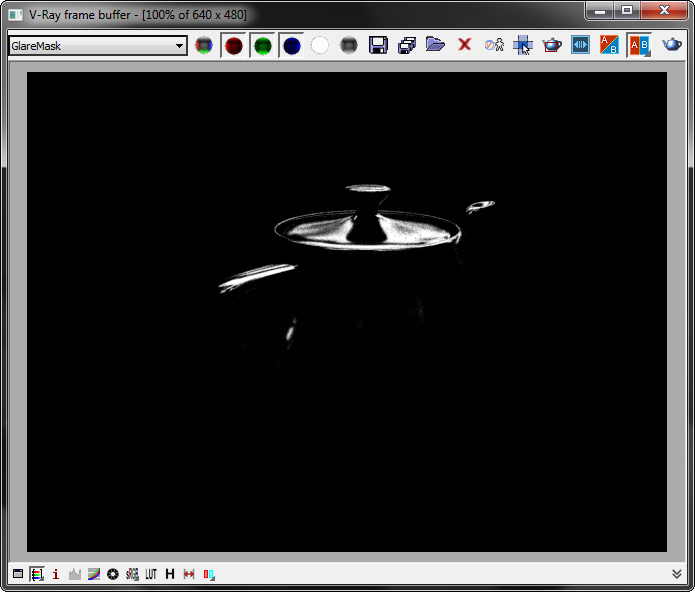
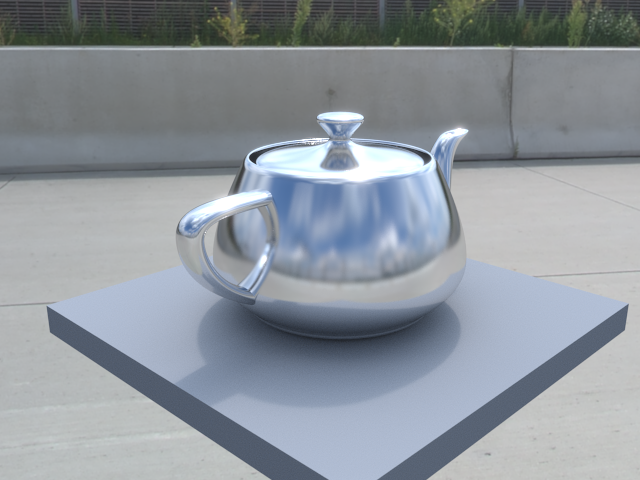
You can check the GlareMask and BloomMask channel after the rendering has finished. Tune your VRayLensEffect parameters and your render settings and render again.
Looks better now, doesn't it?
That's it!
I hope this will help some of you and save you the time to fiddle around with the settings until it looks nice. By the way: the HDRI used in this little rendering is from our product scout Andreas Reimer. Thank you Andreas!
GrowFX 1.8.6 tutorial
Understanding the basics
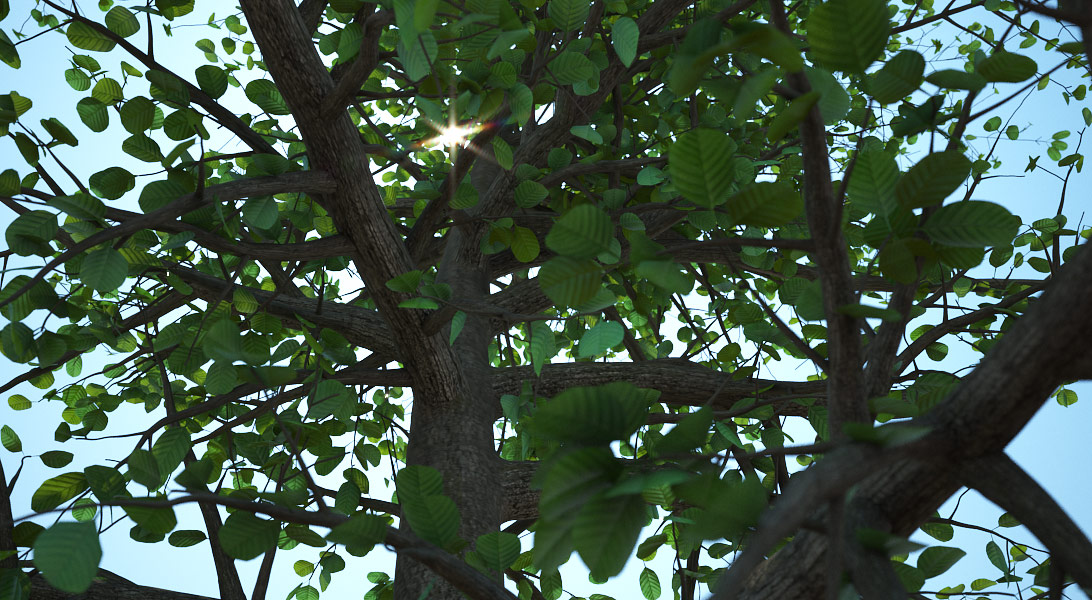
GrowFX seems to be really complicated when you try to make your first tree from scratch. Indeed, it is a lot easier if you understand the basic concept.
Think of a small tree. It's made up of different sections. For example it starts with roots forming the trunk, which has some branches, which have some smaller branches on which there grow some leafes. Every section – regardless which one - can be split up into three parts:
- Source (Where do the section elements grow from?)
- Behaviour (How does the section behave?)
- Appearance (How does the section look like?)
GrowFX splits these three parts into three seperated windows: Distributors path, Modify direction and Mesh parameters. A section is called „path“ in GrowFX terms.
Getting started
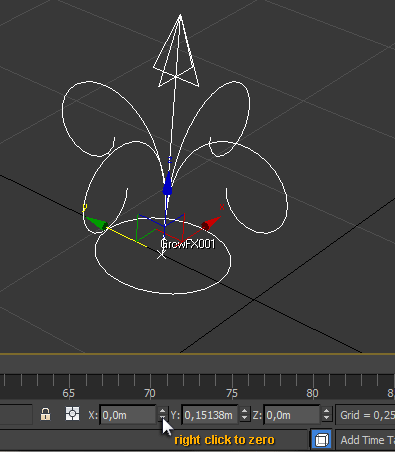 Start with a blank scene. GrowFX generates extremely realsitic trees and plants, which leads to lots of polygons and may slow down 3D Studio Max a lot. You can move your tree into your original scene later as soon as you finished it. Click and drag a GrowFX object/icon into your viewport. Move it to the origin (right click on each of the axis' spinner arrows on the bottom of your screen to set them to zero).
First section
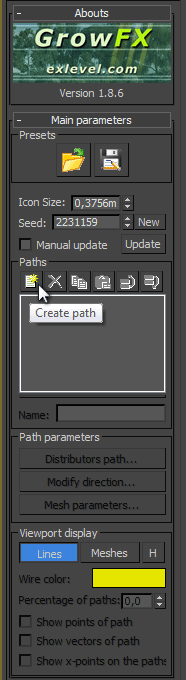
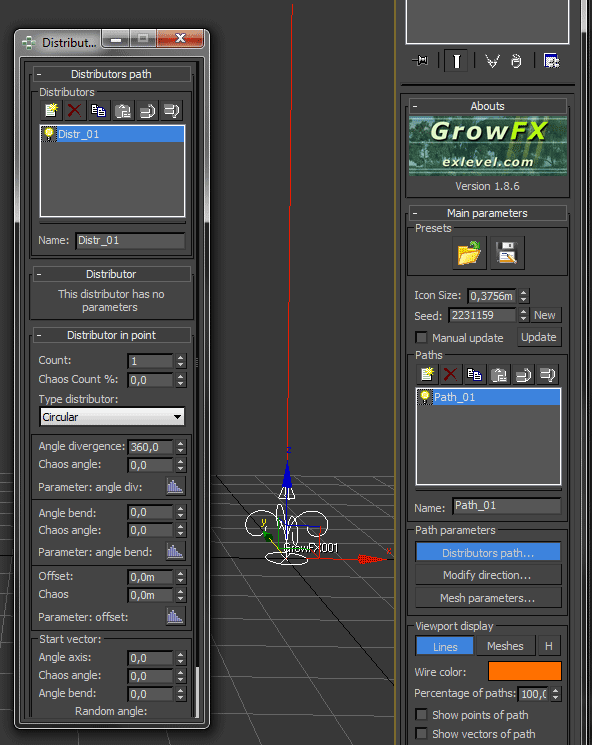
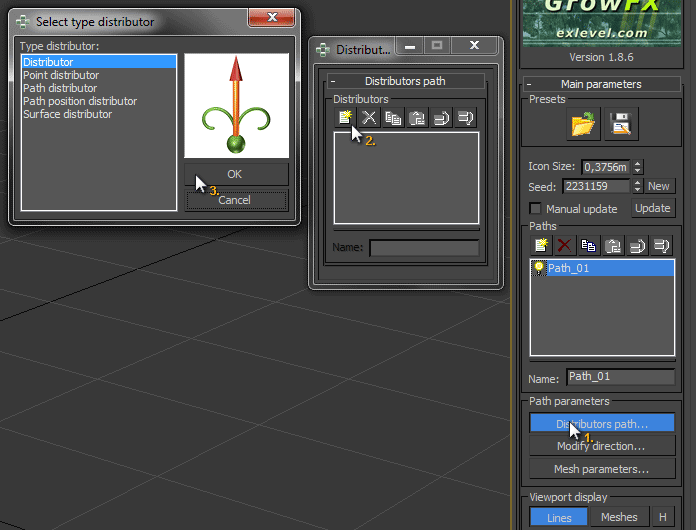
Create a new path and name it „Trunk“. (You should always rename your sections to stay on top of things!) You will first notice that you can't see this path inside your viewport. That's because we didn't specify the source. Click on „Distributors path“ while you have the „Trunk“-section selected. This „Distributors path“ window lets you choose from different distributors and every distributor has its own meaning. Since we want the trunk to come out directly from the GrowFX icon, we select the first distributor. Most of the time the small image next to the selection list shows exactly what each selection does. Now we can see a straight line coming out of the GrowFX icon. We can now close the „Distributors path“ window and leave everything to its defaults. We finished the first part of our section: the source.
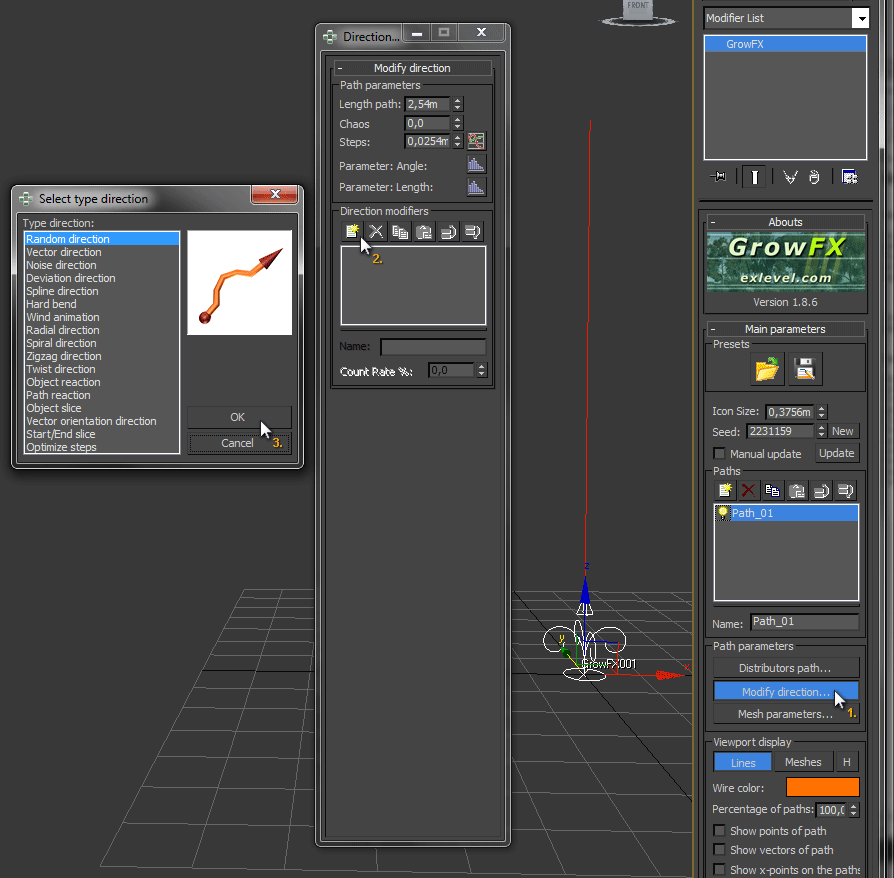 Now it's time to determine the behaviour of our section: the second part. The trunk is relatively easy to control. Open the „Modify direction“ window. Here you can control the section's length and direction. Add a direction modifier and select the „Random direction“ modifier. This will add some natural feeling to our tree. Play with the random direction parameters „Smoothing“ and „Angle max“ until you like the look of your trunk. If you want your tree to bend a little bit, you can add a „Vector direction“ modifier on top of your „Random direction“ modifier and play with the „Strength“ parameter. This was the second part.
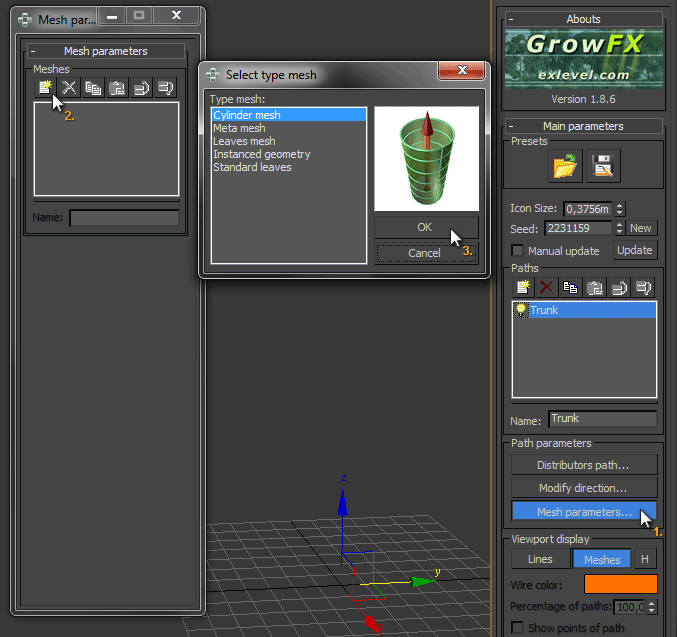 The third part (Appearance) is the last step for this section. Until now we just have an irregular line which does not look like a trunk. We need a mesh, so open the „Mesh parameters“ window and switch the „Viewport display“ from „Lines“ to „Meshes“. Create a „Cylinder mesh“ to form a trunk-like mesh for your path. Set the maximum „Radius“ of your trunk. I chose 30 centimeters (0,3m) in the example. To control the overall look of your trunk, click the graph icon next to the spinner. This opens another window containing a graph. The very left shows the start of your path, the very right shows its end. So from this graph we can read that the trunk starts at 0,3 meter and ends at 0,0 meter, which creates a linear, conical trunk. You can play around by adding some points, but don't get too nasty.
Now we are done with the first section. Congratulations!
Second section


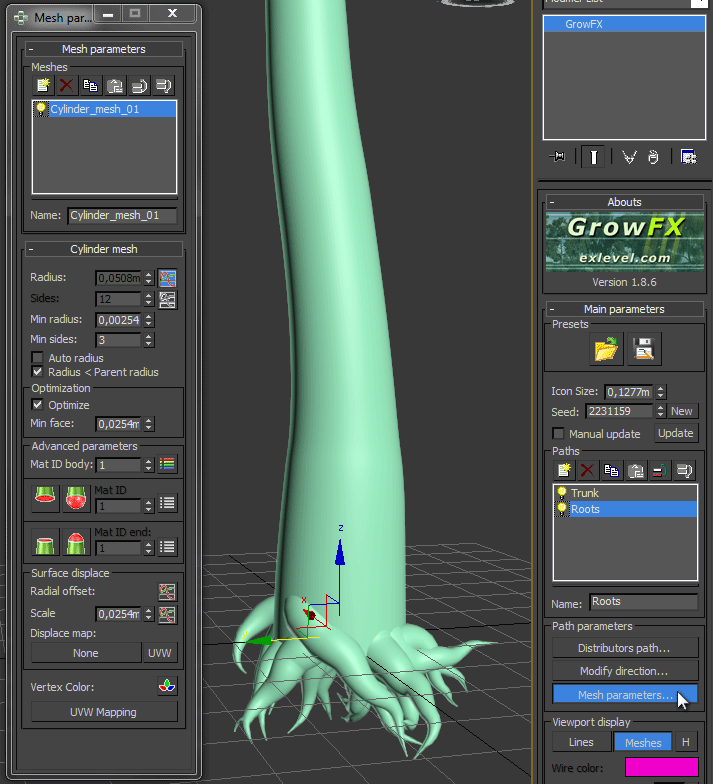
I know. A tree does not start with the trunk, but with the roots. That's true for reality but not for 3D in our case... Create another path (section) and name it „Roots“. Inside the „Distributors path“ window, we add a „Path Position Distributor“ and select our „Trunk“ path as „Starting path“ and add a new position. We want to see some roots off the ground, so we set the „Absolute Position“ to 0.3m and change the number of roots to about 20. Scroll to the bottom and set „Angle bend“ inside the „Start vector“ group to -180. Now our roots are growing into the ground. Add a bit of „Chaos“ to the point offset if you like. Close this window and switch over to the „Modify direction“ window where we add a „Vector direction“ and a „Random direction“ modifier. Play with these parameters until you like what you see. You can also change these parameters after the next step: the appearance. Open the „Mesh parameters“ window and switch the viewport display to „Meshes“. Add a „Cylinder mesh“ and change the parameters in the same way we did with the trunk section.
Okay. This looks a bit strange for now. But let me tell you: we will boost this in the end with a very unique feature of GrowFX, the so called „Meta mesh“. If you can't wait: here you go. 
Third section
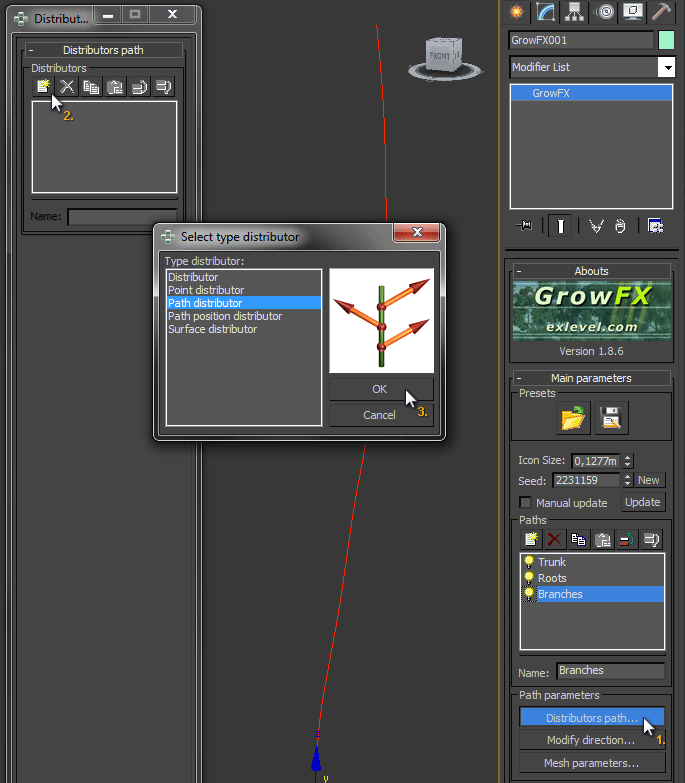
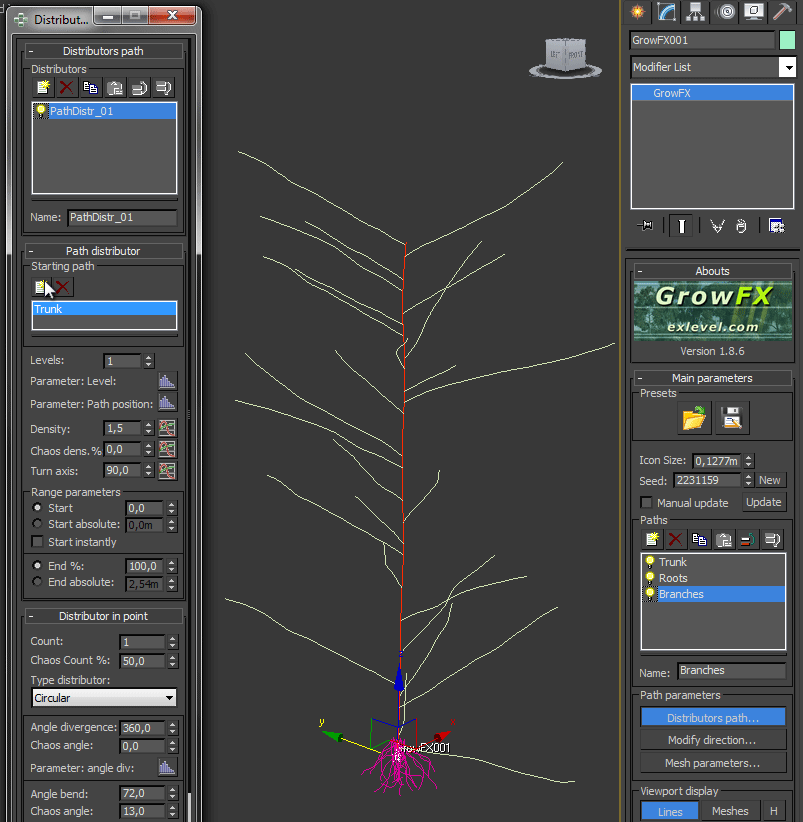

What's next? The branches! You should be able to easily add them by yourself now if you understood the last chapters. Most of the steps should be self-explaning now. One difference is the distributor. We will choose a „Path distributor“ because we will add lots of branches connected to our trunk path. If you don't want branches to grow at the bottom of your tree you can set the „Start“ parameter inside the „Range parameters“ group to something above 0,0. This way GrowFX doesn't create branches below a certain point. Another solution is to change the graph of the „Density“.
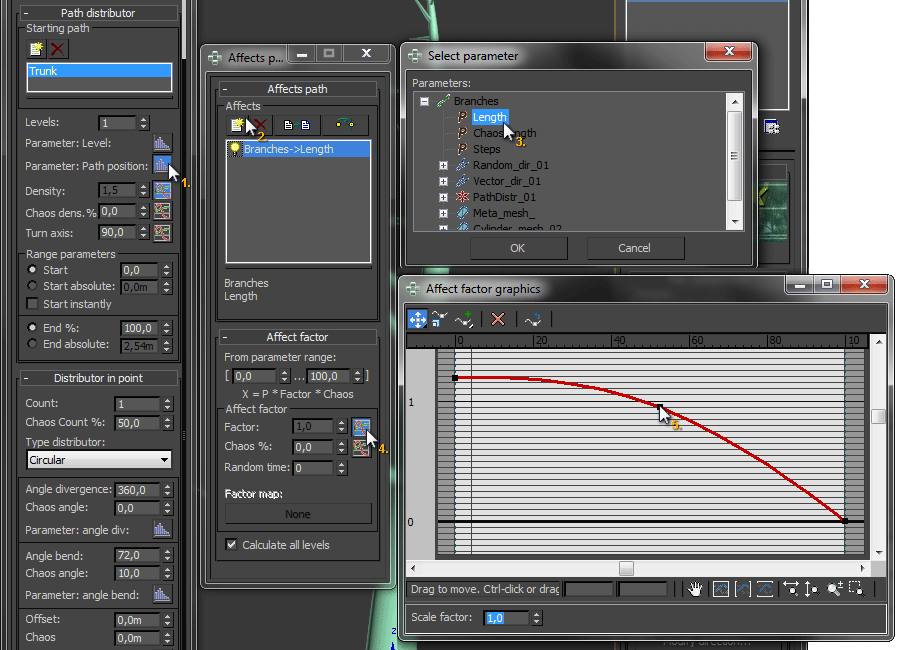 One thing that confused me when I started to use GrowFX are „Affectors“, editable by clicking these icons:
  . Those affectors are very powerful. Let's take a look at „Parameter: Path position“. Read it like this: „the position on the path affects...“. We want something like this: the closer we get to the top of our tree, the smaller the branches should grow - just like in nature. So we choose „Parameter: Path position“, add The length of our branches to the affector and change the graph of the „Factor“ parameter inside the „Affect factor“ group. This leads to a nice looking tree shape.
Fourth section
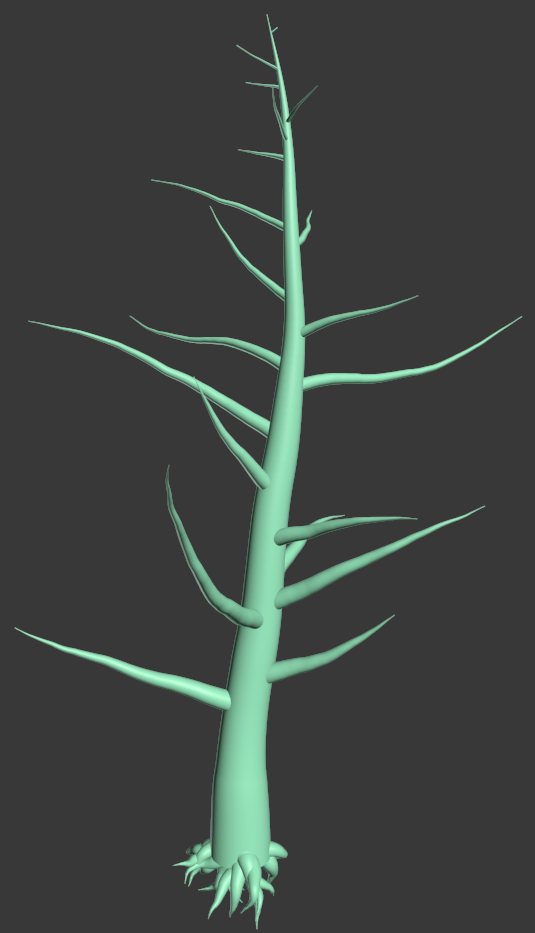

This is where you will add some more branches on top with the branch's path beneath. Play around and have fun!
Fifth and last section
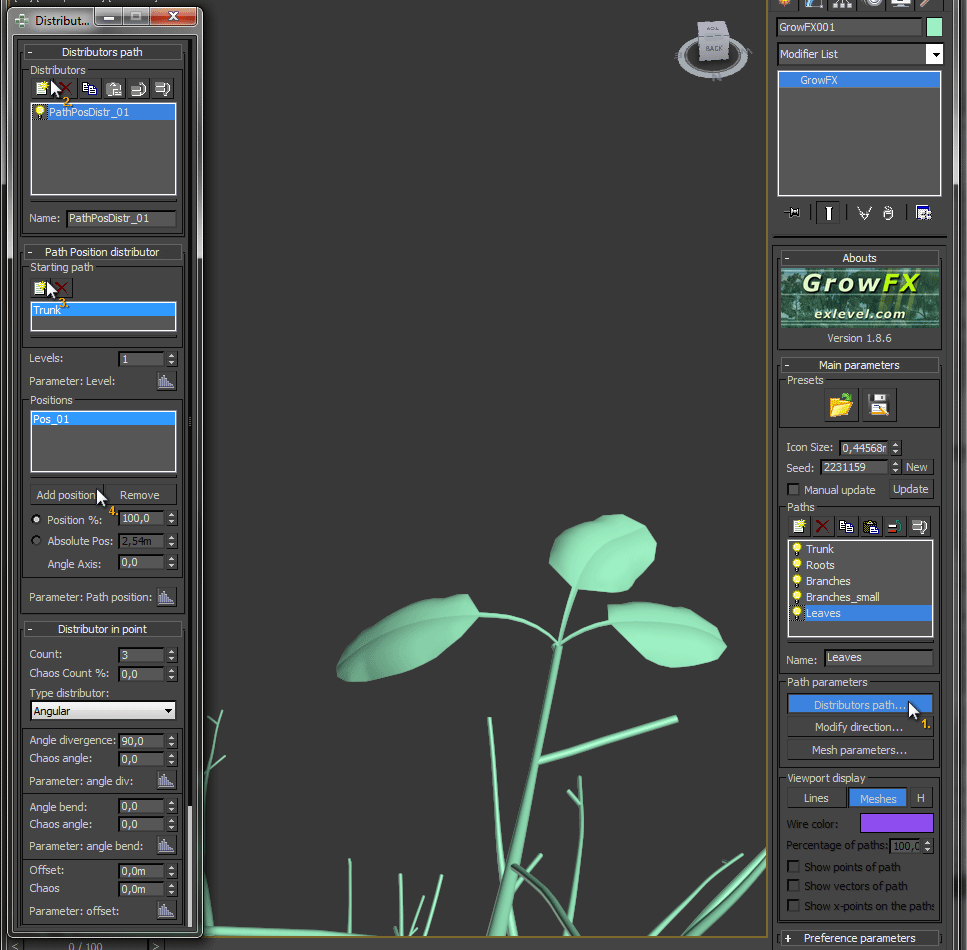 Even if you could go on adding more sections, we will finish our tree with some leaves now. Each type of tree has its own growth behaviour for leaves. We will take a simple approach to put some foliage on our tree. Add a new path called „Leaves“ and add a „Path Position distributor“. First, we will add the trunk as „Starting path“ and add more sources later. Add a „Position“ and leave its parameter at 100% which means we put our leaves at the end of each branch. Change the „Count“ to about 3. Change „Type distributor“ from „Circular“ to „Angular“ and the „Angle divergence“ to 90 for a more leaf-like angle.
For the leaves' behaviour we add a „Random direction“ and a „Vector direction“ modifier in the „Modify direction“ window and adjust the settings.
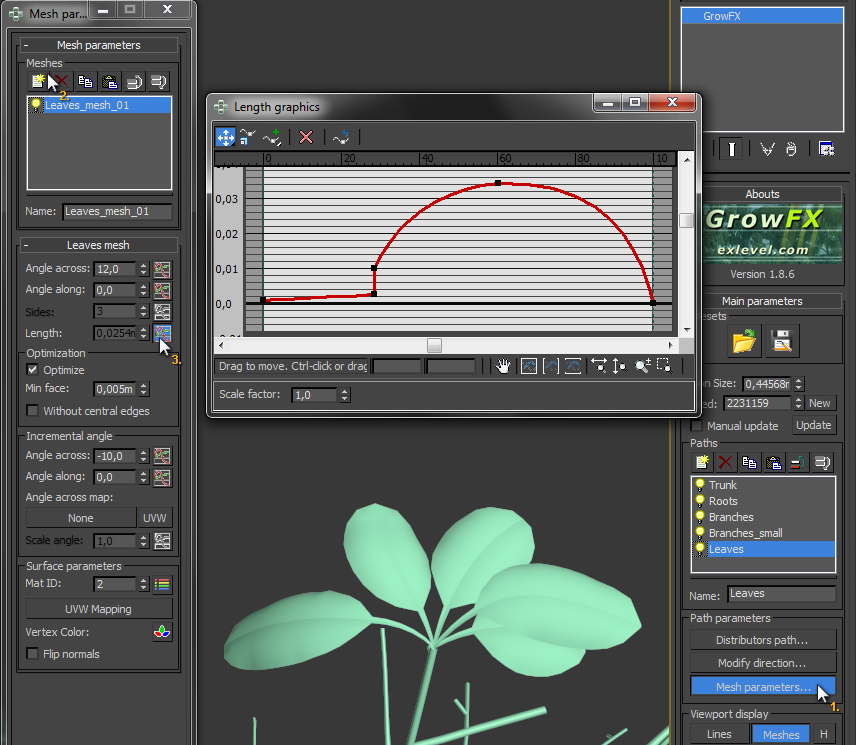 Now to the fun part: the mesh. You can create almost every possible leaf with GrowFX. Just add a „Leaves mesh“ in the „Mesh parameters“ window and edit the graph of the leaves' length parameter. Lean your head to the right while looking at the graph. Do you get it? Yes, this is the shape of a leaf cut in half with its stem included! Cool, isn't it? ;o)
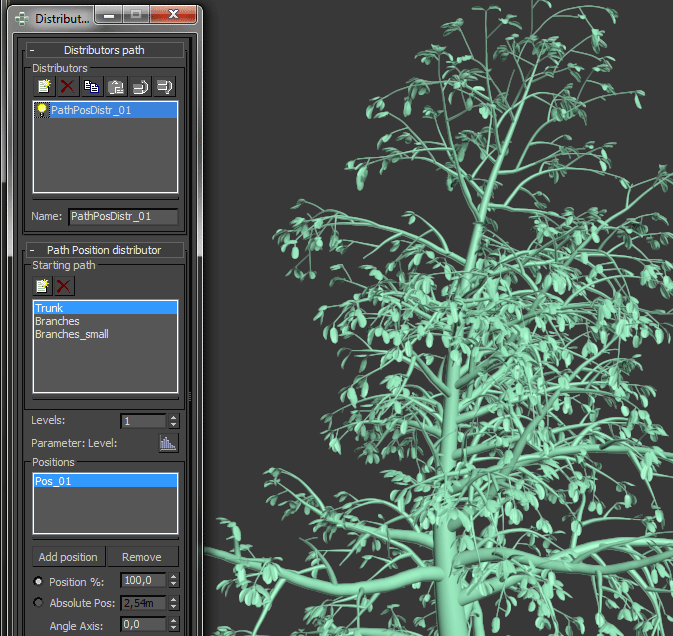 If your leaves look right, just add the other sources to the „Starting path“ list in your leaves' „Distributors path" window. You can also add another „Path distributor“ to your leaves and select your small branches as a „Starting path“ to get more leaves.
Materials and textures
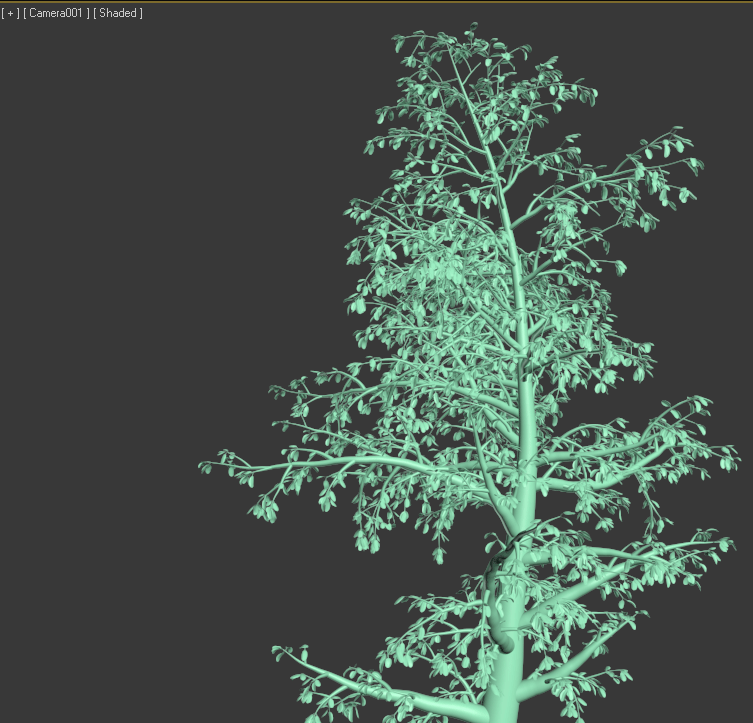
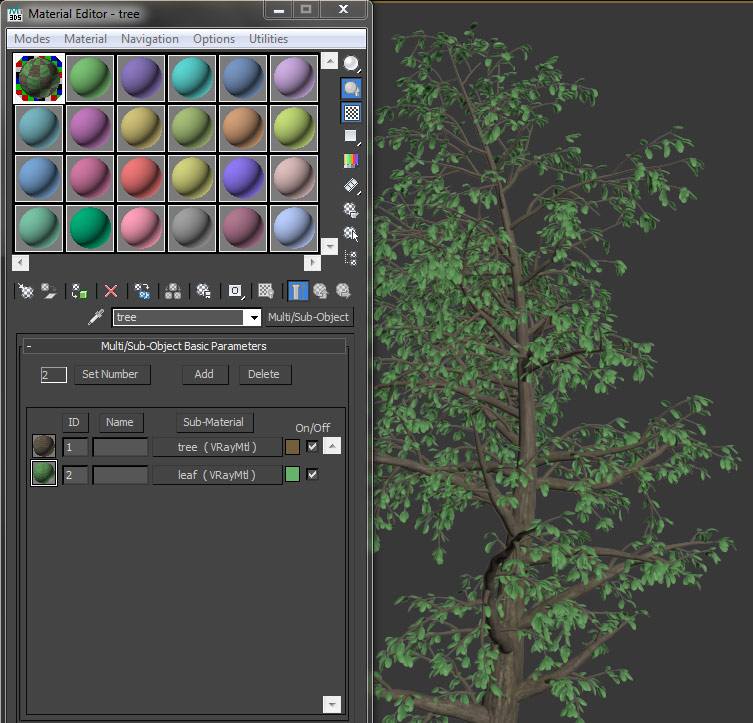
Another great feature of GrowFX is its ability to automatically generate perfect UV coordinates for texturing. First, open the material editor of 3D Studio Max and create a new „Multi/Sub-Object Material“. Set the number to 2. In the first slot we put a brown wood material, in the second one we put a green leaf material. Assign it to your GrowFX tree. It looks much more like a tree now! And GrowFX created really nice UV coordinates for us which don't really need any tuning... Nevertheless, I'll show you how to tune the texture coordinates if you still like to do so.
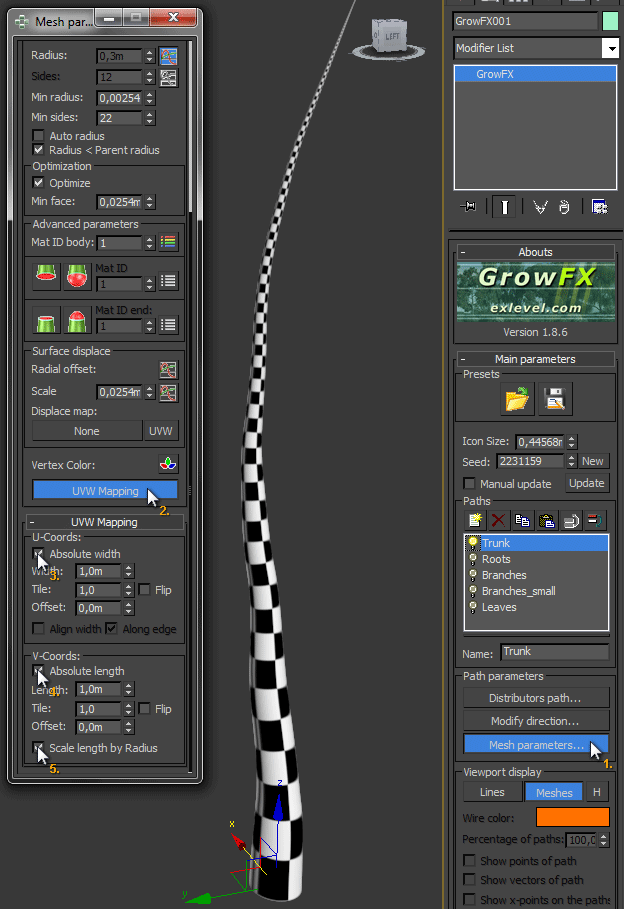 Switch off everything but the trunk by clicking on the yellow light bulb next to the paths and switch over to the „Mesh parameters“ while „Trunk“ is selected. Press the „UVW Mapping“ button and check „Absolute width“ and „Absolute length“ as well as „Scale length by Radius“ and adjust the „Width“ and „Length“ parameters as needed. Use a „Checker“ texture inside your trunk's material to check if your parameters are just fine. Go on with the the rest of your tree and activate one section after the other.
Fine tuning
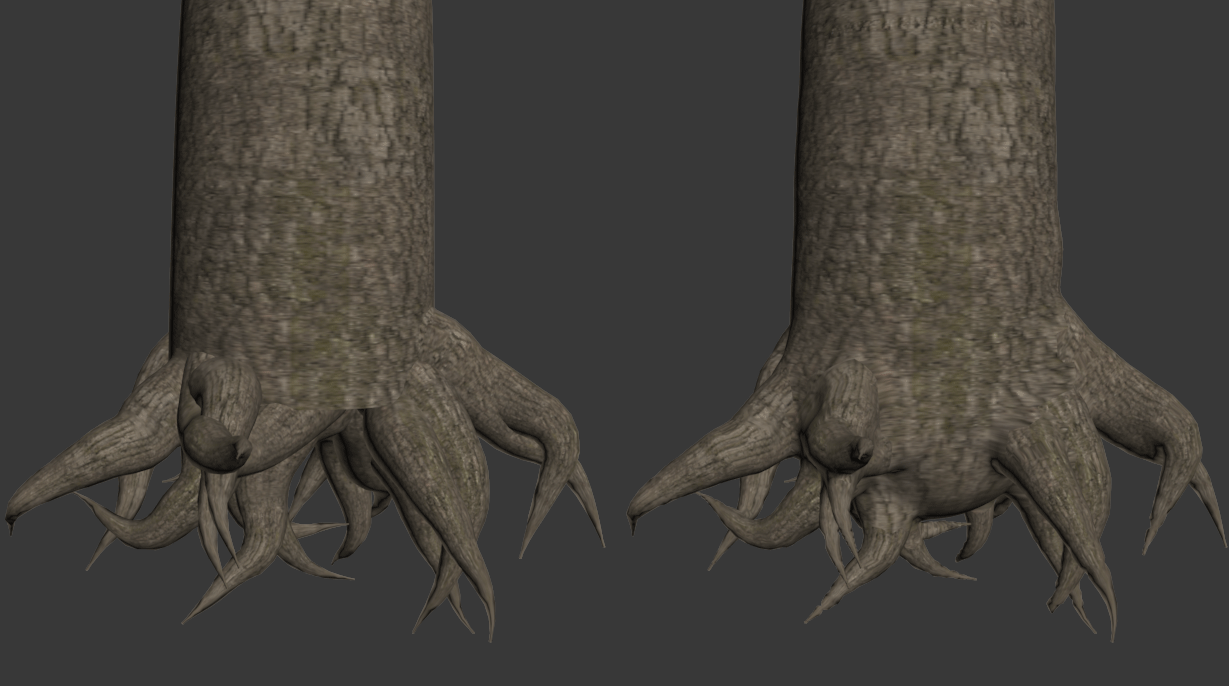 Okay. We now have a tree. But does it look realistic? Not really. Let's unleash the power of GrowFX! Disable everything but the trunk and the roots. Open the „Mesh parameters“, copy the „Cylinder mesh“, paste it and deactivate it. Right click on the new one and choose „Convert to Meta mesh builder“. GrowFX generates the Meta-/Blobmesh from trunk and roots. This should go quite quickly. Do the same steps with the branches. This will take far longer to calculate, but if it's done you can navigate as fast as before. If you want to take this another step further, get a cup of coffee after repeating the Metamesh conversion with the small branches. Go out, have some fun with your dog or your kids, whatever you like to fill the time GrowFX needs for calculations. It will take very long and most of the time it's unnecessary to bring that much details on your trees! But what exactly does this magic meta mesh do? It's melting together your meshes into one mesh, building an enclosing mesh like the surface in nature. Your cylindrical parts don't stick into each other, they get one mesh.
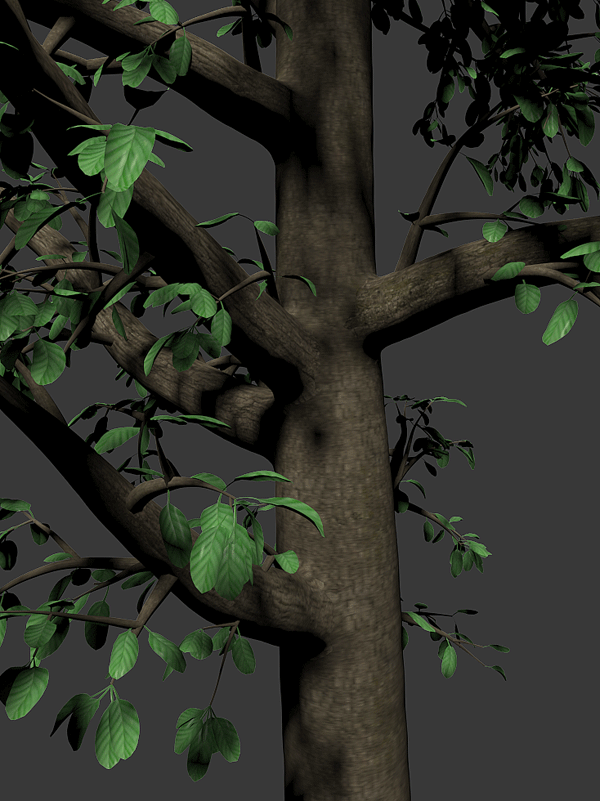 Some other things you can do is to rise the „Min sides“ and lower the „Min radius“ and „Face size“ parameters all over the different windows to get more detailed meshes and smoother paths. It may be very essential for your leaf meshes to look good.
Useful tipps
- It's always a good idea to disable sections/paths if you don't need them to speed up calculations.
- Do also use „Lines“ in the „Viewport display“ to speed things up.
- Always keep the „Cylinder mesh“ in addition to your „Meta mesh“ and only switch to this mesh type before you export your final tree.
- Make a copy of your tree scene before you convert the tree/plant to a mesh
- Save a VrayProxy or other kind of Proxy mesh to speed up renderings
Where do I get GrowFX?
 You can buy GrowFX directly here on zwischendrin.com in our scripts & plugins section for 240€!
Like us on facebook
recent posts
- Nice 3D Animation and a Making Of
- Our plugins for 3D Studio Max (Design) 2014
- V-Ray 2.40.02 available for download
- New VRay version released! (2.40.01)
- Grab it while it’s… cold??
archive
- March 2015 (1)
- April 2013 (1)
- February 2013 (2)
- November 2012 (1)
- September 2012 (1)
- August 2012 (1)
- July 2012 (3)
- June 2012 (3)
- April 2012 (1)
- January 2012 (1)
- December 2011 (3)
- November 2011 (1)
- October 2011 (1)
- September 2011 (1)
- August 2011 (1)
- July 2011 (2)
- June 2011 (3)
- May 2011 (1)
- March 2011 (1)
- February 2011 (2)
- January 2011 (1)
- December 2010 (1)
- October 2010 (3)
- September 2010 (1)
- August 2010 (1)
- July 2010 (2)
- June 2010 (1)
 latest products
- #00301 spherical hdri: ukraine kitchenPrice: €12.99 | Format: .hdr | Resolution: 9000x4500 | Depth: float | Location: Kharkov, Ukraine
- #00298 (spherical hdri)Price: €12.99 | Format: .hdr | Resolution: 9000x4500 | Depth: float | Location: Kharkov, Ukraine
- #00297 (spherical hdri)Price: €12.99 | Format: .hdr | Resolution: 9000x4500 | Depth: float | Location: Kharkov, Ukraine